noahjohnson.ai
A personal blog and portfolio built as a faithful tribute to the Claude Code desktop UI.
Built with

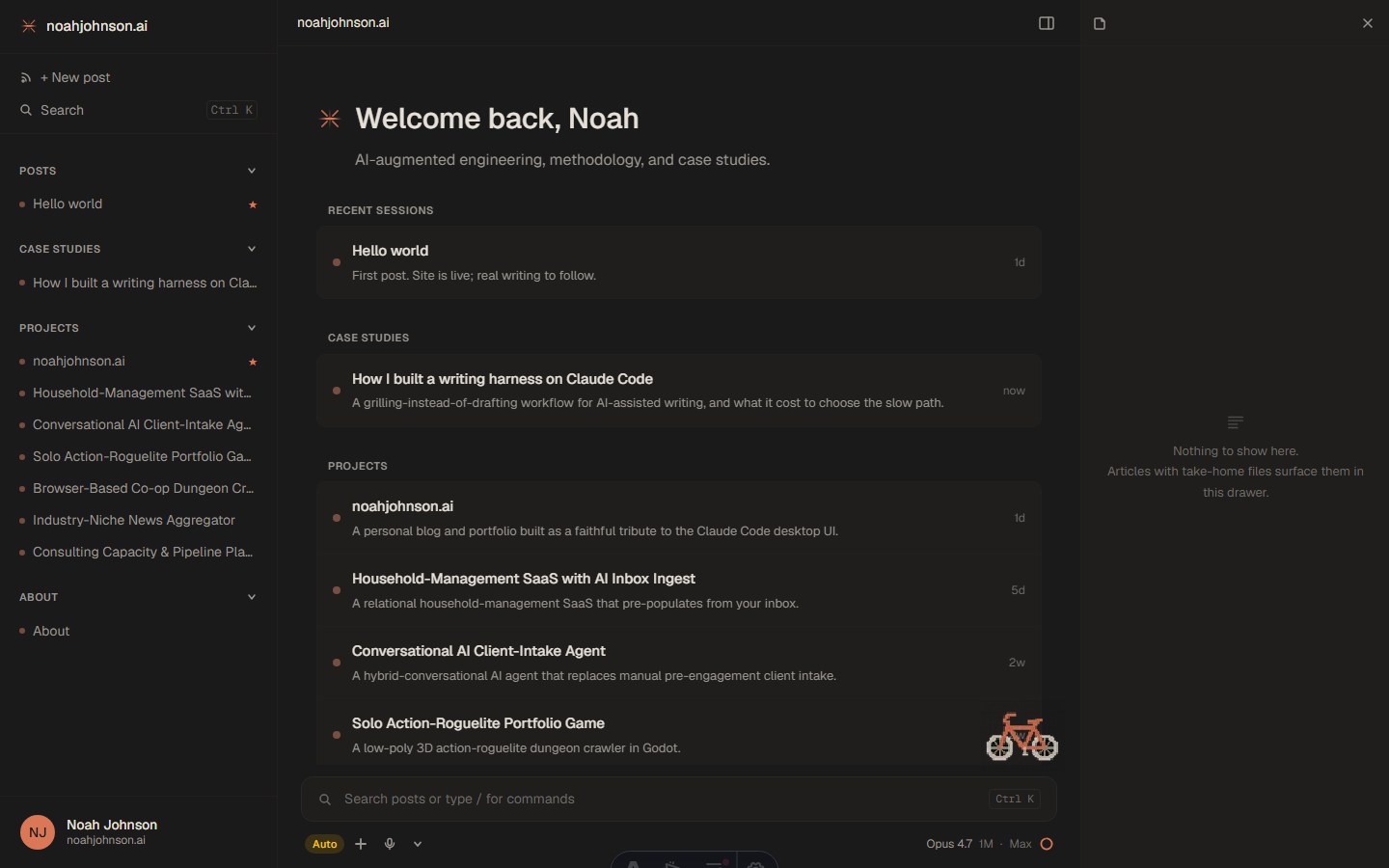
This is the site you’re reading. It’s a personal blog and portfolio designed to look and feel like the Claude Code desktop app — three-pane shell (sidebar + main + drawer), warm-dark palette, terracotta accent, a pixel-bike mascot perched above the prompt bar, and a usage dial that pretends to be 92% maxed out.
Why
I wanted a writing home that felt like the tool I was writing with. Most blog themes are blog themes. None of them looked like the surface I spend my working hours inside. So I made one.
It also became the first real test of a workflow I want to write about: pair-programming a non-trivial UI clone with an agent, end-to-end, from “what theme should I use” to “production at the apex domain.”
Stack
- Astro 6 with Astro View Transitions — fully static, instant nav, persistent shell elements
- Tailwind CSS 4 — colors defined as
@themetokens, no separate config file - Geist + Geist Mono — variable fonts, self-hosted
- Pagefind — search index built at deploy time, modal triggered by ⌘K / Ctrl K
- No client framework — vanilla JS for the interactive bits (drawer toggle, resize, content tracking)
- Hosted on Vercel
What’s actually in here
Three-pane layout. Sidebar with grouped sessions (Posts / Projects / Case Studies / About, by year), main content column, right-side .md viewport that auto-loads the current page’s source. The drawer is resizable (drag the left edge) with width persisted to localStorage, and on mobile it slides in as a full-overlay panel with a backdrop instead of squishing the column.
The right-side drawer does double duty. On articles that ship with take-home artifacts, the drawer opens to the first inline-linked example file by default. Click any other example link in the article body and the drawer swaps without navigating. A small toggle flips back to the raw page source, and every example file is downloadable as raw markdown directly from the drawer header.
Authentic-ish chrome. The toolbar below the prompt has the Auto pill, the +/mic/chevron icons, the model label, and a usage dial that opens a popover showing Context Window 92%, 5-hour 88%, Weekly 91%, Opus only 76%. All decorative. The dial is pure CSS group-hover, no JS.
Status dots. Posts you haven’t visited show an orange dot in the sidebar — tracked in localStorage, mirrors Claude Code’s “needs input” attention signal.
Mascot. A pixel bicycle in Claude orange, anchored to the right edge of the centered content column so it stays above the search bar at every viewport.
OS-aware shortcuts. ⌘K on Mac, Ctrl K on Windows/Linux — sniffed at runtime, applied to both the sidebar Search and the bottom prompt.
A scroll-progress tick timeline. Posts and case studies render a thin vertical bar in the gutter to the left of the content with one tick per article section, positioned proportionally to where the heading actually sits in the article (so a long section gets a bigger gap than a short one). The current section’s tick fills in terracotta as you read. Hover any tick for the section name; click to smooth-scroll. Hidden on mobile.
Articles open with a TLDR and a read-time. Every published post and case study has a ## TLDR callout at the top in a distinct treatment (terracotta left border, small uppercase eyebrow heading), plus a calendar-month-precision pubDate and an auto-computed minutes-to-read estimate alongside the tags. The TLDR is human-written, not auto-generated — the same grilling-instead-of-drafting discipline as the article body.
Case studies are their own thing. Projects can pair to one or more long-form case studies (the relationship is enforced at build time so a case study pointing at a nonexistent project fails the build, not the deploy). The cross-link renders as a chip on both sides of the relationship, so the case study tells you which project it’s about and the project surfaces every case study attached to it without any manual frontmatter on the project page.
A writing harness lives behind it. Posts and case studies aren’t drafted longhand; they’re produced through a five-gate writing loop (setup → outline → per-paragraph approval → take-home discovery → voice-check) running inside Claude Code. The first piece written through it is the case study on building the harness itself. The take-home artifacts attached to that article are the generalized pieces of the harness — drop-in for any reader who wants to build the same kind of thing on their own site.
Source
github.com/noahjohnsonai/noahjohnson-site
The code and content here are © Noah Johnson. All rights reserved. You’re welcome to read, link, and share excerpts with attribution. Any other use — copying, modifying, redistributing, or building on this work, commercially or otherwise — requires written permission. Reach out at noah@noahjohnson.ai.
